KEEP ENCOURAGEMENT CLOSE

Add Sister2Sister
to your Home Screen.

Put an icon on your phone so you can open Sister2Sister with one tap, like an app.

Start on the homepage: MySister2Sister.com

If you opened this link inside Facebook, Instagram, or another app, open the website in Safari or Chrome first.

These are simplified illustrations. Button positions and wording may look different on your phone.

USE SAFARI

iPhone instructions

  1. Open Sister2Sister in Safari

    Open Safari on your iPhone. Type MySister2Sister.com in the address bar and load the homepage.
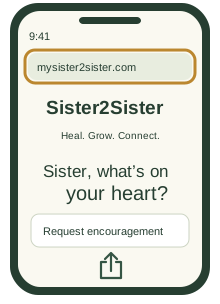
    Illustrated example for step 1: Open Sister2Sister in Safari
    Example screen
  2. Tap Share

    Tap the Share symbol: a square with an upward arrow. On some Safari layouts, tap More (…) first, then Share.

    Illustrated example for step 2: Tap Share
    Example screen
  3. Choose Add to Home Screen

    Scroll through the Share menu and tap Add to Home Screen. If it is missing, scroll to Edit Actions and add it.
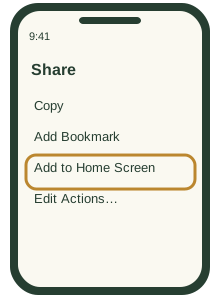
    Illustrated example for step 3: Choose Add to Home Screen
    Example screen
  4. Name it and tap Add

    Use the name Sister2Sister. If Open as Web App appears, turn it on. Tap Add, then find and tap the new icon on your Home Screen.
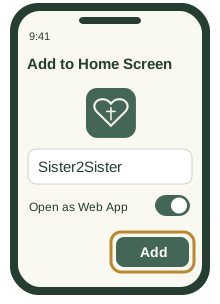
    Illustrated example for step 4: Name it and tap Add
    Example screen

USE CHROME

Android instructions

  1. Open Sister2Sister in Chrome

    Open Chrome on your Android phone. Type MySister2Sister.com in the address bar and load the homepage.
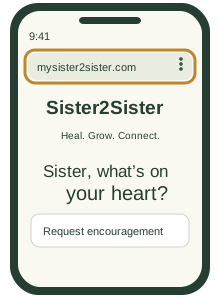
    Illustrated example for step 1: Open Sister2Sister in Chrome
    Example screen
  2. Tap the three-dot menu

    Tap More (⋮), usually to the right of the address bar.
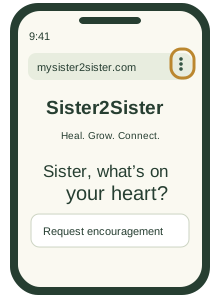
    Illustrated example for step 2: Tap the three-dot menu
    Example screen
  3. Choose the shortcut option

    Tap Install and create shortcut, then Create shortcut. Other versions may show Add to Home screen or Install app.
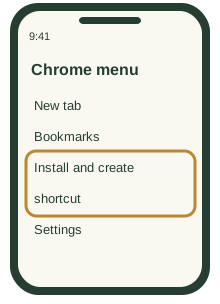
    Illustrated example for step 3: Choose the shortcut option
    Example screen
  4. Confirm and find your icon

    Use the name Sister2Sister, then tap Add. If you chose Install app, tap Install and follow the prompts. Look for the new icon on your Home Screen or in your apps.
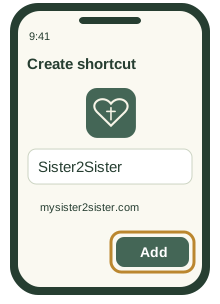
    Illustrated example for step 4: Confirm and find your icon
    Example screen
Sister2Sister Home Screen icon

You’re ready!

Tap the Sister2Sister icon whenever you want Scripture and prayer. Adding the icon is free. Daily prayer email subscriptions are separate.

Need a little help?

I can’t find the Home Screen option.

Use Safari on iPhone or Chrome on Android, and open the website in the full browser rather than inside a social media app. On iPhone, try Share → Edit Actions. On Android, look for Install and create shortcut, Add to Home screen, or Install app.

I don’t see the new icon.

Check your other Home Screen pages. On Android, check your app list too; if the icon is there, press and hold it and drag it onto your Home Screen.

Does the website need an internet connection?

Yes. Connect to Wi-Fi or mobile data to use the website and request encouragement.

Return to Sister2Sister

A little clarity

Your request is sent for AI-assisted scripture selection and prayer. We do not save it.

Free encouragement searches are not saved. Requests are sent securely through our service to Cloudflare for AI-assisted scripture selection and a prayer. Topic buttons provide prepared selections. We do not save those requests or responses in our database. Avoid names, contact details, and identifying information. Short-lived request counters use a daily salted network hash to limit abuse; your request text is not included.

Dictation uses your browser’s speech recognition service, which may process audio through its provider. We do not record or save your audio. Review the transcribed words before submitting.

Email sharing opens your own email app. The email address entered for sharing is not saved by this form. Scripture selections, prayer, and email sharing are free. No account or membership is required.

Scripture Search searches public-domain BSB and KJV Bible text. Search results quote the stored Bible text directly; they are not AI-generated. We do not save your search phrase. Bible text sources.

Scripture selections display the Berean Standard Bible (BSB) by default. Select the KJV button in a scripture box to read the King James Version, or BSB to switch back. Both translations are public domain in the United States. Short selections are labeled as excerpts. Encouragement is spiritual support and does not replace professional care. Support resources are selected using words in your request and may miss or misunderstand a concern. This site is not monitored for emergencies and does not contact services for you.

Donation payments are processed by JIM on its checkout page. For a custom donation link, your name, address, cell number, email address, and requested amount are sent through our email service to info@MySister2Sister.com. Those details are retained in email so we can respond; they are not added to an encouragement request. An acknowledgement confirms your request, not a completed payment.

Daily Encouragement and gift subscriptions cost $12 per person and category for one year. You can order for yourself and others together. We save the purchaser’s email, optional giver name, recipient names and emails, categories, email consent, payment verification and acceptance details. Confirm your order by email before payment. A single subscription uses the $12 JIM link; larger orders receive one payment link for their full total. Checkout notices are not proof of payment. We manually verify the completed payment before activation. Your own subscription begins after verification; each gift starts only after its recipient accepts the invitation. Invitations address the recipient by name and identify the giver if a name was supplied. An unnamed gift is described as from someone who cares about you. Names and email addresses are shared with Resend to deliver email. We preserve email opt-outs. No automatic renewal or text messages. You may cancel anytime using the email’s manage or unsubscribe link. Payments are nonrefundable. Earlier subscriptions and private management links remain supported. Subscription details are separate from free encouragement requests. Contact info@MySister2Sister.com for help or a deletion request.

Evening Stories are original fiction, not verified testimonies. Public counters show story views, with repeat opens counted once per reading session each day. Private charts show estimated daily readers and completions, not proof of reading. Daily salted session and network hashes help deduplicate views; names and prayer requests are not included in readership records. The Request a Prayer link opens the existing free encouragement form. There you can review the Scripture and prayer, copy the response, or choose to share it by email. Requesting encouragement does not enroll you in a subscription.